Ore Factory Squad Co-op Roles & Permissions Host Guide
Use the host computer's Roles app to give a joined guest only the access needed for their next co-op task.
Quick answer
If a guest can join your game but cannot do the task they were invited to do, start with the host's Roles app on the computer. The default Employee role has limited permissions; the host can edit that role or create a custom one. Review the current role before a player uses an expensive or high-impact action.
The v1.0.6 update adds permission areas for Dynamite, Casino, Stock Sell, and vehicle purchases. Use the current Roles screen for the exact labels and available choices.
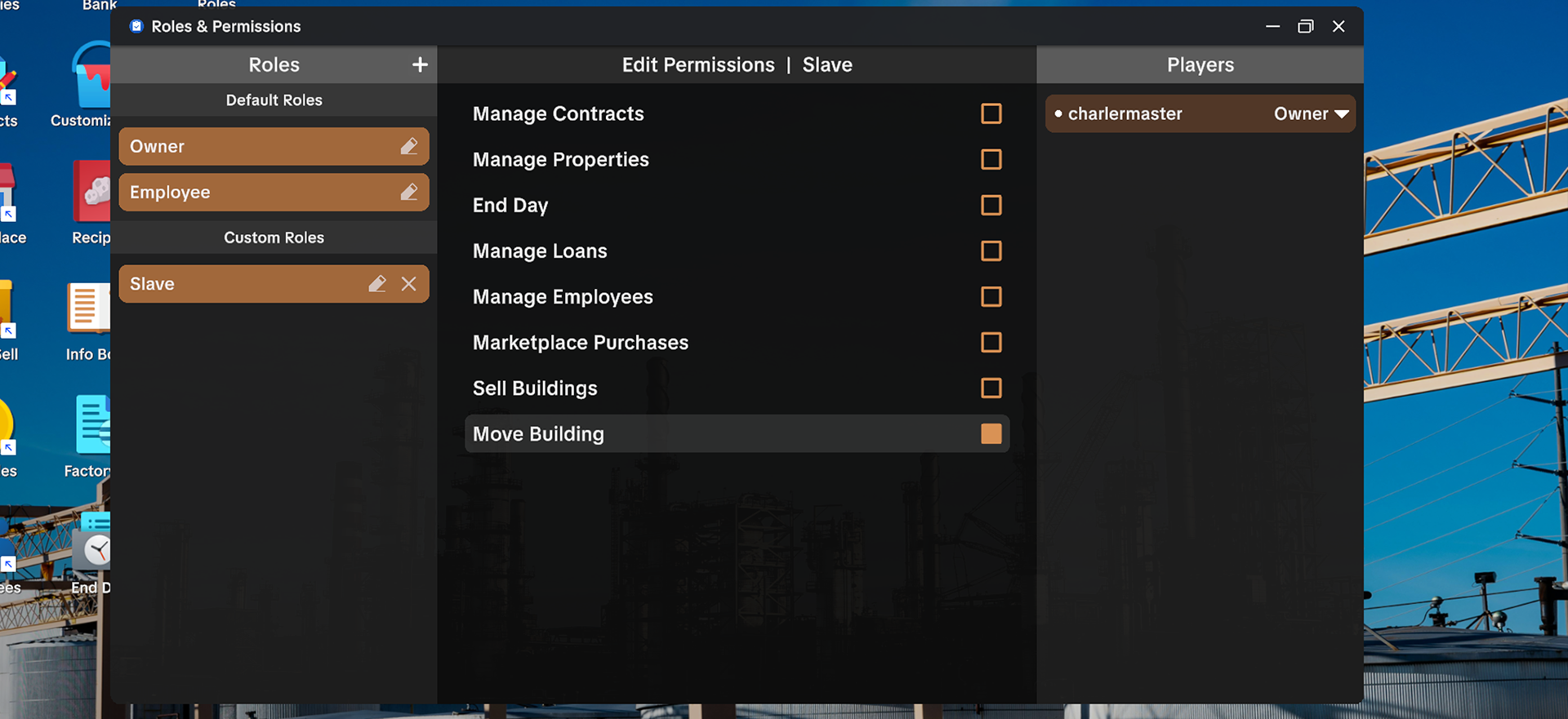
Confirm that this is a permissions problem
This guide fits when the guest has already joined the session but a specific action is unavailable or denied. First name the action: using Dynamite, making a vehicle purchase, selling stock, or another host-controlled task.
If the player cannot enter the lobby at all, use the co-op join and Steam invite guide instead. An invite, lobby-code, or connection failure is not solved by changing a role.
Give only the access needed for the next job
- Have the host open the computer's current Roles app.
- Identify the one action the guest needs to perform.
- Review the assigned Employee role before changing anything.
- Edit that role or create a separate role when the next job needs different access.
- Let the guest test one action while the host can observe the result.
- Review the role again before opening wider access for purchases, stock, or destructive tools.
This keeps the test narrow and makes it clear which permission changed the result. Recheck the role after reconnecting or updating the game.
Match the role to the task
| Guest's next task | Check in the current Roles app | Avoid assuming |
|---|---|---|
| Use Dynamite | the Dynamite permission area added in v1.0.6 | that every Employee can use it by default |
| Use Casino or Stock Sell | the visible Casino or Stock Sell permission area | that money-related access is grouped under one permanent label |
| Buy a vehicle | the current vehicle-purchase permission area | that a guest can make expensive purchases just because they can drive |
| Do ordinary co-op work | the assigned role's visible limits | that joining a lobby grants every action automatically |
Before widening access, review the current screen and let the guest test one action.
If the guest is still blocked
Check the exact action again in the current Roles screen and record what the guest sees. Do not keep changing unrelated role options until you know which action is blocked. If the problem remains after a clear, repeatable test, include the host role, guest role, game version, action, and result in a bug report.
For a shared delivery workflow after permissions are settled, use the Contracts and Pallet Packer guide. For a stuck or disconnected player after a completed contract, use the co-op contract disconnect guide.
Sources
- Official v1.0.5 Smart Filters & Safer Squads update — Roles and Permissions computer app, limited default Employee role, and host editing or custom-role context
- Official v1.0.6 update — added Dynamite, Casino, Stock Sell, and vehicle-purchase permission areas; it does not publish a complete current toggle list
- Current Steam co-op discussion — player report that a host needs to grant role access; it is not a full permissions specification