How to Find Oil in Ore Factory Squad: Radar Mode & Reserves
Check the property oil-reserve panel, use Ore Detector Radar Mode, reach the reserve, and clean it with the Jackhammer without claiming fixed coordinates or depths.
Quick answer
To find oil, first check the property's Oil Reserve Details, then switch the Ore Detector to Radar Mode in the digging area. Follow the oil signal underground, confirm the reached reserve, and use the Jackhammer to clean it before you try to extract. The official update confirms those steps, but it does not give a fixed coordinate, depth, or best-property ranking.
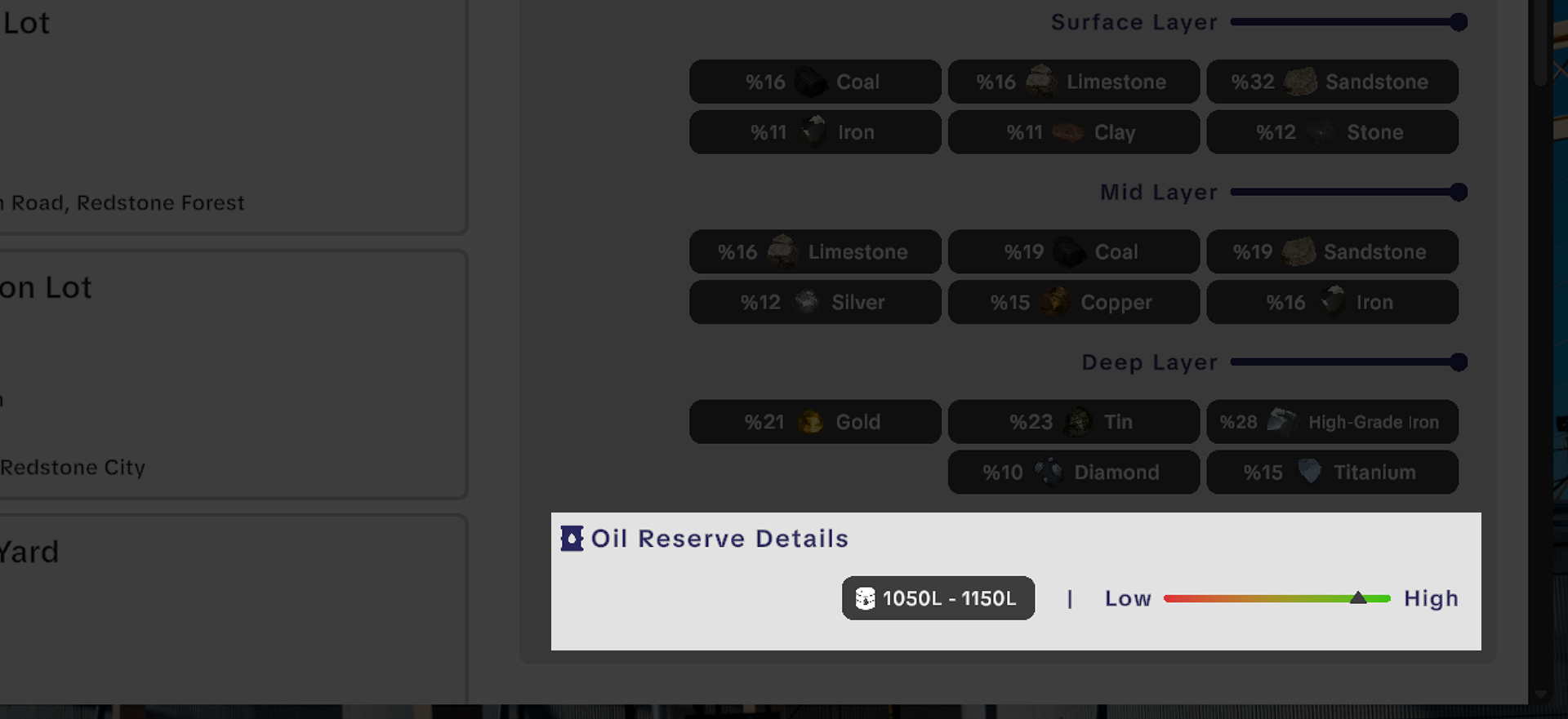
Check the property before digging
Open the property information and look for the Oil Reserve Details area. This is the fastest way to decide whether the lot is worth an oil-search trip. Treat the panel as the current lot's information, not as a promise that every Desert property has the same amount or quality.
If you are still choosing between sites, use the property and Remaining Resources guide for the existing ownership and recovery rules. It does not replace the new oil panel.
Use Radar Mode as a search tool
- Take the Ore Detector to the area you plan to excavate.
- Change it to Radar Mode.
- Use the radar reading to choose where to continue digging instead of copying another player's coordinates.
- When you reach the oil-bearing area, stop expanding the tunnel long enough to identify the reserve.
- Clean the reserve with the Jackhammer before adding extraction equipment.
Radar Mode tells you where to keep investigating. It is not evidence for a fixed depth, a guaranteed straight route, or a permanent map coordinate. Keep your access route safe enough to return to the same reserve with the Pipe Head.
Confirm the reserve before buying more equipment
The useful checkpoint is not only seeing a radar result. You need a reached and cleaned reserve, then a clear route for the Pipe Head. If the reserve feedback says it is empty, do not keep changing pipes or trucks as though the problem must be downstream. The v1.1.1 hotfix adds clearer reserve amount and empty-reserve feedback specifically to make this check easier.
What to do next
Once the reserve is cleaned, follow the Oil Pipe Head extraction guide for the first pipe run and extraction checks. If you need a route back to your factory, use the Tanker Truck and Oil Tank transfer guide. For the complete sequence, start at the Masters of Oil hub.
Sources
The official v1.1.0 Masters of Oil announcement names Oil Reserves, Radar Mode, and Jackhammer cleaning. The official v1.1.1 hotfix is the source for the reserve-feedback change.